- Dec 2, 2025
How To Organize Your Eden Workspace For Maximum Creativity & Productivity
- Noah Vincent
- Eden Guides
- 0 comments
So:
You've created your Eden account...
Moved all of your Kortex files and important documents there...
And started playing with it to try out its possibilities.
But the question you may have now is...
"How do I organize all that in a simple but efficient way?"
And that's the question we're going to answer in today's email.
But before I give you my complete organization system...
We need to understand two very important concepts when it comes to folder management:
Top-down VS Bottom-up organization.
Top-down organization is the classical way of organizing things.
It consists of creating your folders and sub-folders first, and then populating them with documents.
Bottom-up is the exact opposite.
It consists of first creating notes and adding items in your workspace...
Then use tags & links to let the organization emerge naturally from your notes.
Both have their pros & cons and are better suited for different kinds of tasks.
Top-down is better for project management, while Bottom-up is better for knowledge management.
And the great thing about Eden?
It's that you can actually do both at the same time.
And that's exactly what we're going to do.
So let's begin with my top-down organization system.
Step 1: The PARA Method.
So the first thing you must choose when creating your folder system is a framework.
I personally like to keep things simple, so I use the PARA method, popularised by Tiago Forte.
It's primarily designed for execution and project management and not for creative idea generation.
(Where going to see later in this newsletter the framework we're going to use for that)
The PARA method consists of creating 4 folders to manage your entire digital life:
First, we have Projects.
It involves active work that has both a defined outcome and a specific deadline.
Content, products, clients' work, they're all projects.
I personally keep all of the I'm working on inside my Project folder, such as newsletters, YouTube videos, courses, etc.
Then we have Areas.
It includes all of your ongoing responsibilities with no end date.
These require maintenance to meet a standard, not the completion of a goal.
That's where you'll manage everything related to your health, finances, or relationships.
They're not a project with an end date; they are areas you'll maintain for the rest of your life.
The third folder is the Resources folder.
That's where you'll store any resources and reference material that'll help you with your current or future projects, but require no immediate action.
That's personally where I store all of my AI prompts, reference guides for AI, workflows, templates, SOPs, checklists, and all of that juicy stuff.
And last but not least...
We have the Archive folder.
That's where you'll store everything that isn't related to your current projects anymore.
So any projects you just completed, and resources or areas that are no longer relevant, are going to be stored here.
The goal is to prevent you from cluttering your active folders, where you'll do most of your work, so you maintain clarity and focus, while at the same time having the ability to retrieve any past projects or resources you may have created in the past.
And finally, something that I just started implementing recently is an "Inbox" folder.
You see, Eden doesn't have a capture feature like Kortex had.
I know a lot of you loved that feature (me included), but after talking about it with Dan and the team, it makes sense why they removed it.
But that doesn't mean you can't create your own capture system inside Eden.
Just create an "Inbox" folder inside your workspace, and every time you want to store an idea, create a quick note for it.
Right now, you'll still have to move it manually to the inbox folder if you don't want it to clutter the root folder of your workspace, but I know they'll be implementing a feature soon where you can select the default folder for new notes.
When this is out, you'll just have to select the inbox folder, and that's it, you have your own capture system.
Just use the list view inside your folder, and everything is like it was with Kortex.
So to summarize, here's how it looks in my Eden workspace:
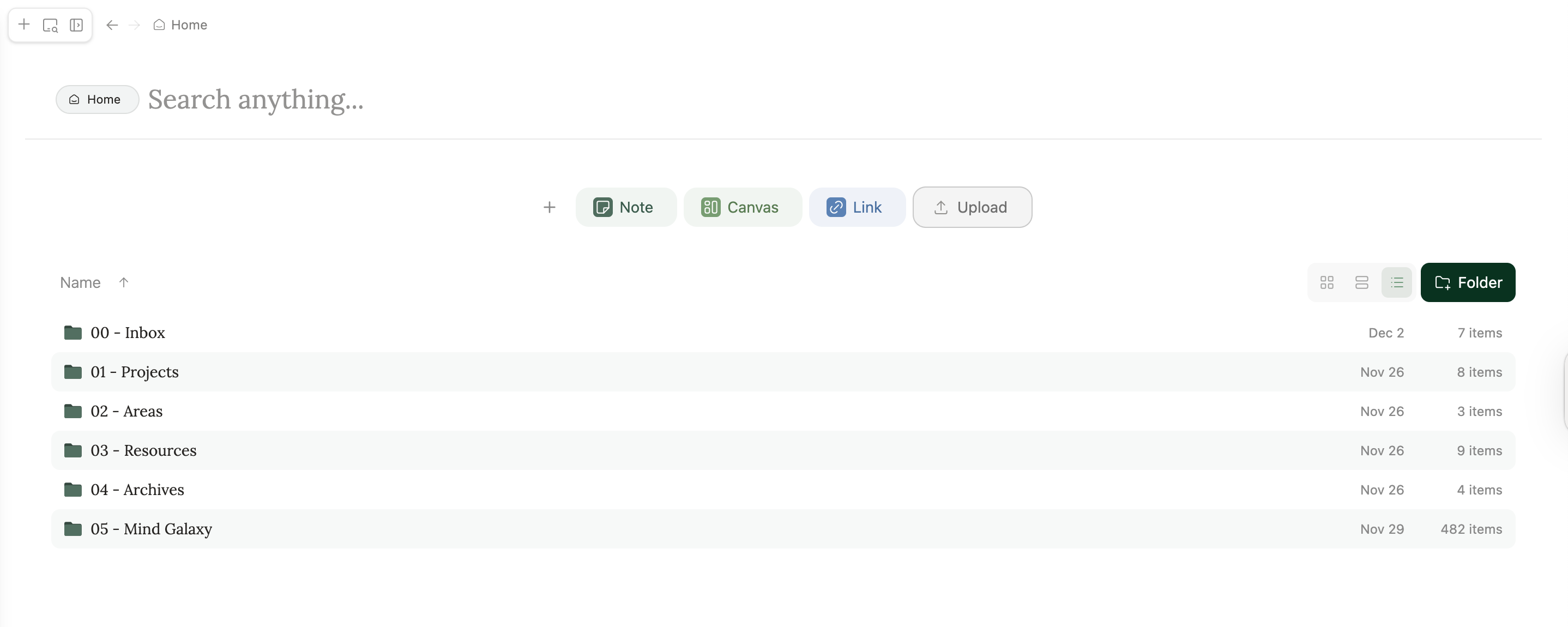
(I use numbers to easily sort them by alphabetical order, since we can't manually move them in the sidebar yet)
But as you can see...
There is a fifth folder called "Mind Galaxy" in my workspace.
And it's the final step for having the perfect hybrid organization system inside Eden, which combines both top-down & bottom-up organization:
Using the Zettelkasten Method.
The Zettelkasten Method is a popular note-taking method popularized by Nikhlas Luhmann, a German scientist, who is famous for using this method to write more than 70 books, 400 academic papers, and more than 90,000 notes.
(Keep in mind that everything was analog at the time, bro was an absolute note madman)
Of course, we're going to apply his framework to manage our note-taking system, because it's the best approach for idea-generation and creativity.
I'll write a deeper piece about how to use and adapt the Zettelkasten Method to Eden, but to summarize, it consists of 4 key steps:
1) Fleeting Notes.
These are quick captures of ideas, thoughts, or highlights.
They serve as the raw material for the system and are designed for speed rather than perfection.
In Eden, your fleeting notes are raw notes you've written, highlights you've copied and pasted from Readwise, or even an entire YouTube video transcript that you've saved inside your workspace.
2) Literature Notes:
These are summaries of content (articles, books, podcasts) rewritten in your own words in a dedicated document.
This step is used to transform information into knowledge, demonstrate understanding, and filter what is worth keeping long-term.
In practice, you'll create a literature note for each piece of content that you want to master, and start rewriting the concepts and ideas that were important to you inside this note.
3) Permanent Notes:
These are single, atomic ideas extracted from Literature Notes.
They must be standalone concepts that can be understood by themselves and focus on one idea per note.
They will be the main notes that you'll create to make sure you really understand the concepts in depth, and the raw material you'll use to feed your AI chats to create content or course material.
4) Connections:
This step involves linking Permanent Notes to create a network of related thoughts.
The goal is to transform isolated facts into a thinking system where new insights emerge from unexpected combinations.
So when you create a new note, you ask yourself how this idea relates to other ideas in your workspace, and create links with these other notes while explaining why you linked them together.
I've seen people in the Kortex discord saying that they can't create connections in Eden, but you absolutely can.
You just need to use "@" instead of "[[]]"
Your note folder will be the main place where you'll store all of your fleeting, literature, and permanent notes, with NO other folders.
Everything must be at the same level to promote serendipity and unexpected connections.
In practice, it looks like this:
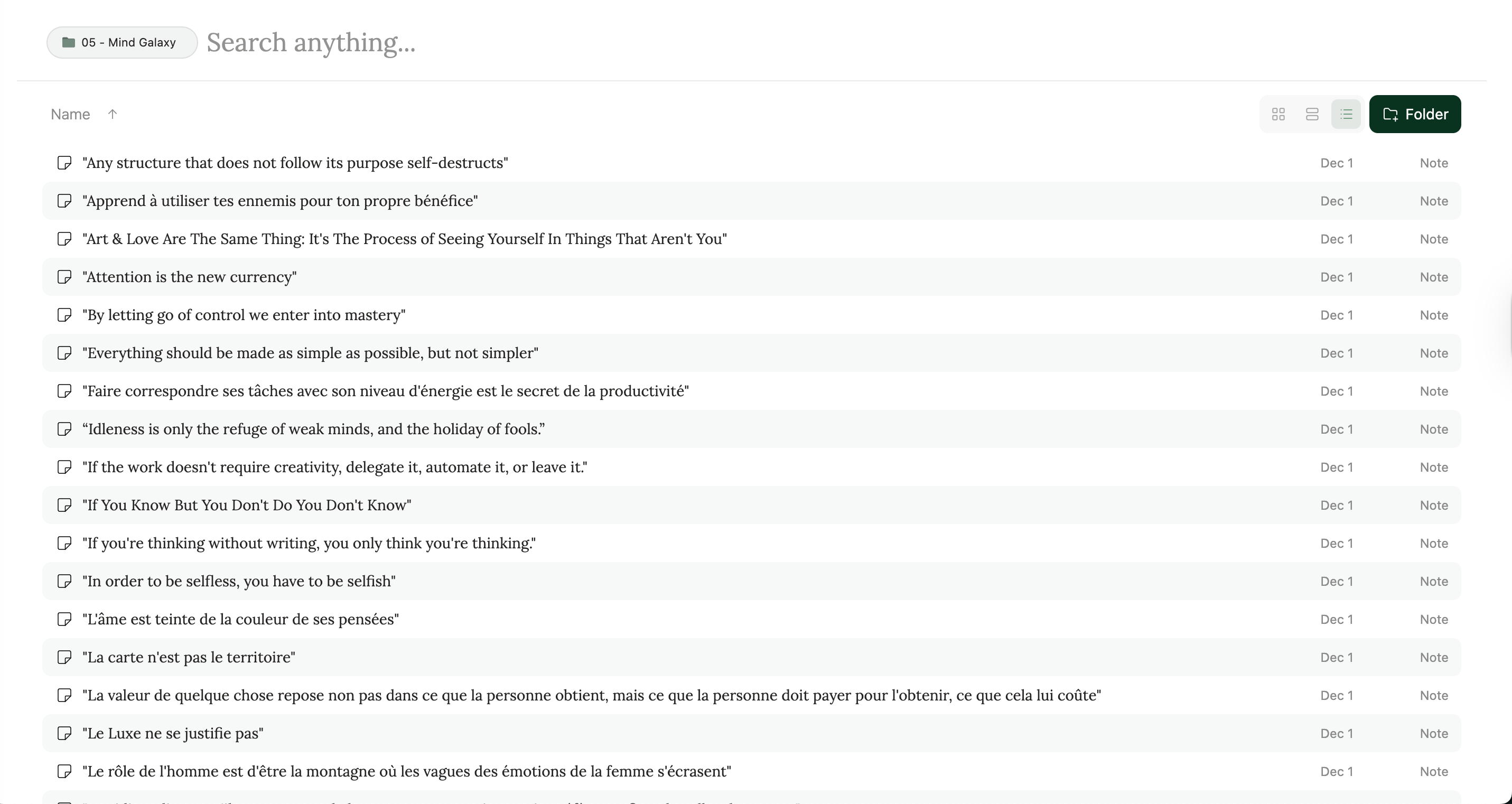
I'll create a dedicated video showing how to apply the Zettelkasten Method inside Eden, so stay tuned.
(You'll receive an email about it when it's out anyway)
This hybrid organization allows you to get the best of both worlds.
The PARA method ensures clarity and speed of execution when working on active projects that need your attention...
While the Zettelkasten Method inside your Note folder is your dedicated creative space where you can play and connect ideas to deepen your thinking and creativity, and benefit from serendipity.
This integration in your workspace also creates a virtuous circle, as you can pull from your knowledge base at any time while working on your projects.
Also, make sure to keep your system minimalist.
One of the main rules in systems thinking is that complex systems that work emerged from simple systems that worked in the first place.
If you try creating something too complex and rigid when you start, you'll just get overwhelmed, and it'll prevent you from being more creative and efficient, which is the opposite outcome that we seek.
Start simple, only create stuff that you need to work on right now, and improve your workspace as your needs emerge.
Feel free to reply to this email if you have any questions about this.
And remember, I'm going to update Noah's Ark bank with updated templates, tools, SOPs, and AI prompts for Eden, but I'll need to wait until they activate the share feature again to share it with you.
If you don't want to wait, you can just import your Kortex workspace to Eden after adding all the resources of Noah's Ark bank inside Kortex.
To import your Kortex Workspace, it's simple:
Go to Kortex and find the token at Settings → Account → Kortex Token
Copy that token
In Eden, go to Settings → Import
Paste the Kortex Token
Wait for the import to be completed (can take a while if your workspace is big)
Anyway, I hope this guide will bring you some value.
I'll soon turn it into a YouTube video to make things even clearer for new users.
But as a member of the Ark, you get the juice in early access, aha.
Please, reply to this email with any questions that you may have, as they are gold for my future emails and videos, and to better understand your needs.
Thanks for reading,
And as always...
Welcome back to the Ark.
Noah.